Free
0
Make game review an everyday habit.
- Analyze 3 games per day
- Try moves in 3 games per day, with no move limit
- Tsume puzzles and practice from your own games
Understand the moves you played. Revisit the chances you missed.
Turn your game records into clear analysis and puzzles of your own.


Free to start. No sign-up. iPhone / Android
Explore the app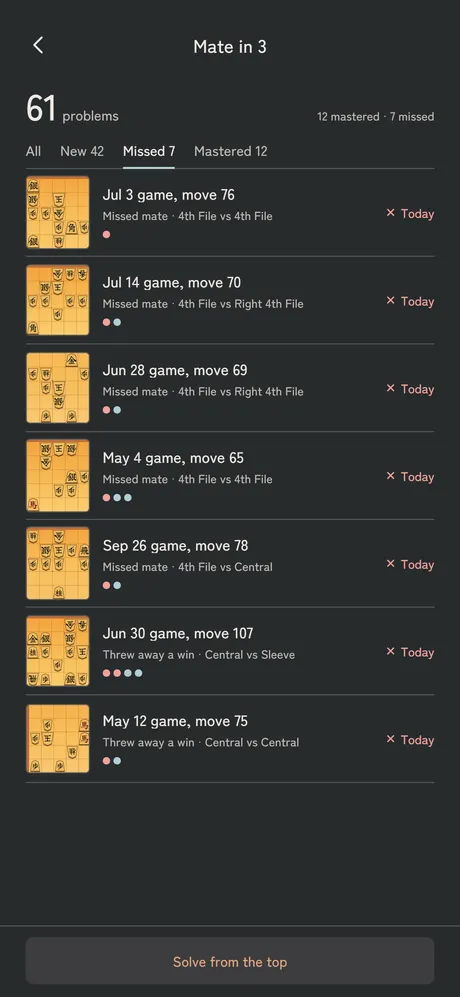
Your games. A fresh perspective.
Import copied game records, shared URLs or files Shogi Wars
 Shogi Quest
 Piyo Shogi
A GAME. A DISCOVERY.
Find the turning point, try another move, and practice what you missed.
Give your next game something to build on.
01 Analysis
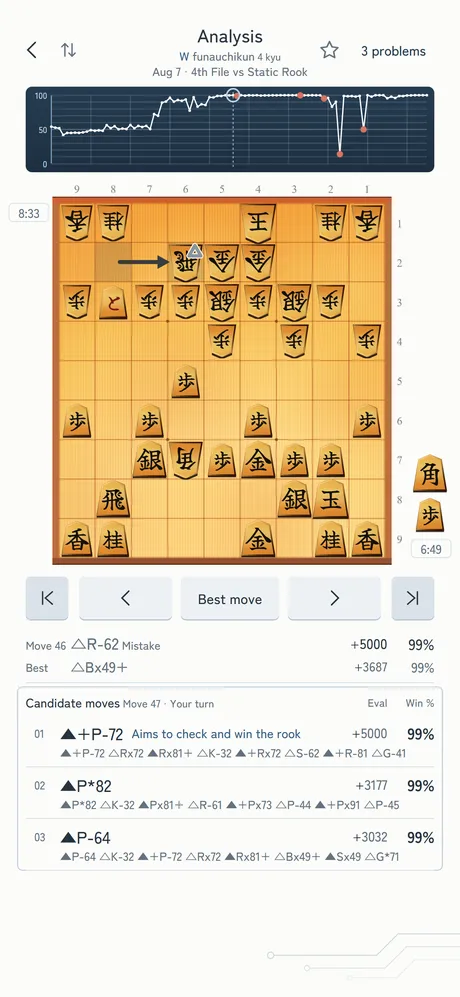
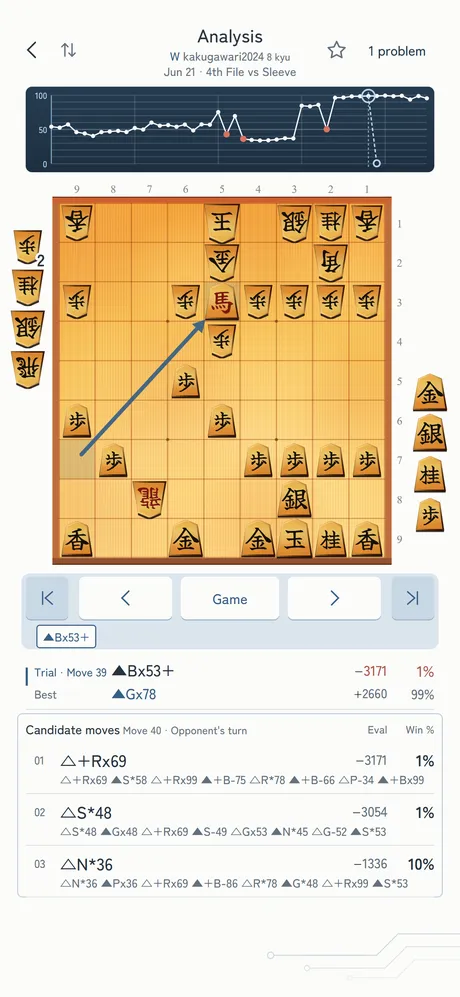
Follow the win-rate graph to a position worth revisiting. Compare your move with the best move, then play through the line that follows.
02 Try a move
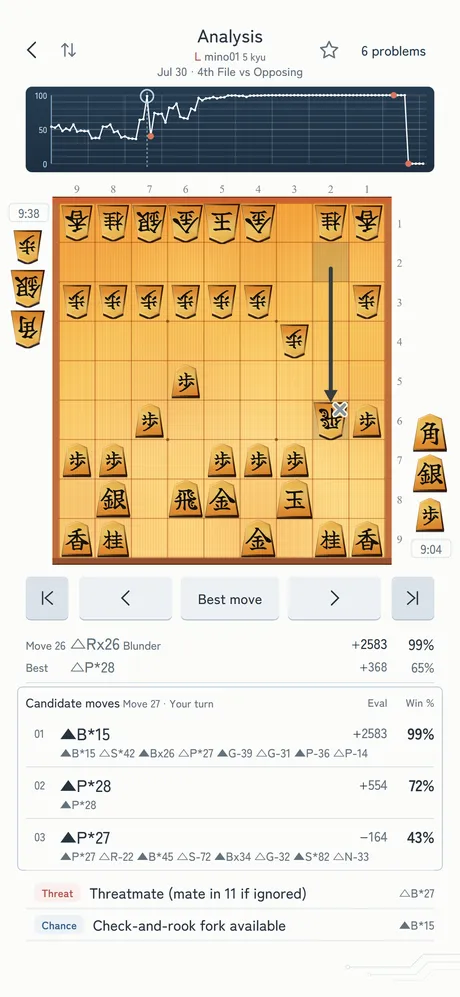
Move a piece on the Analysis board, and the position after your move is analyzed on the spot: its win rate and your opponent’s replies. A move outside the top three candidates, a move you hesitated over during the game: play it, and you’ll have the answer.
03 Tsume
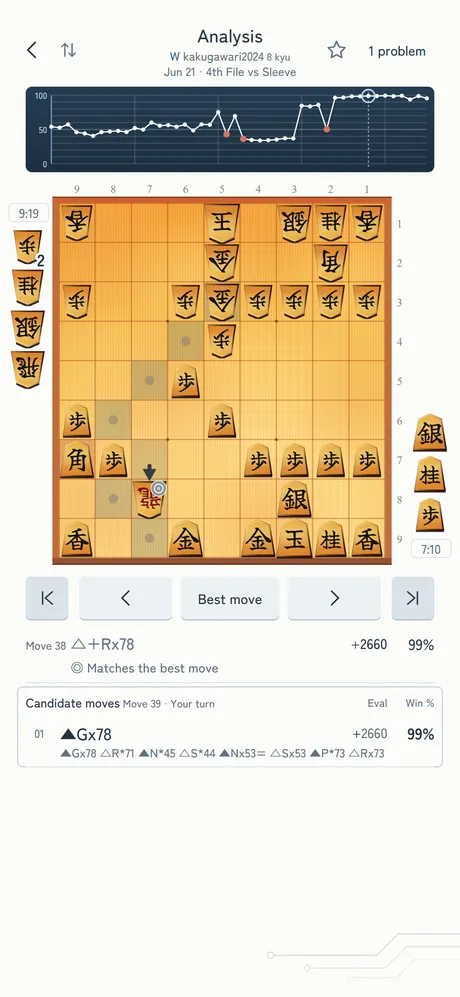
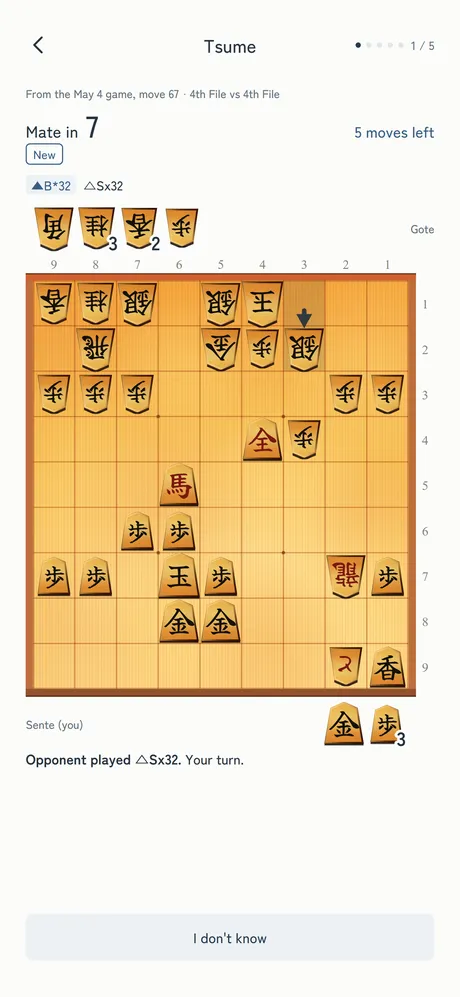
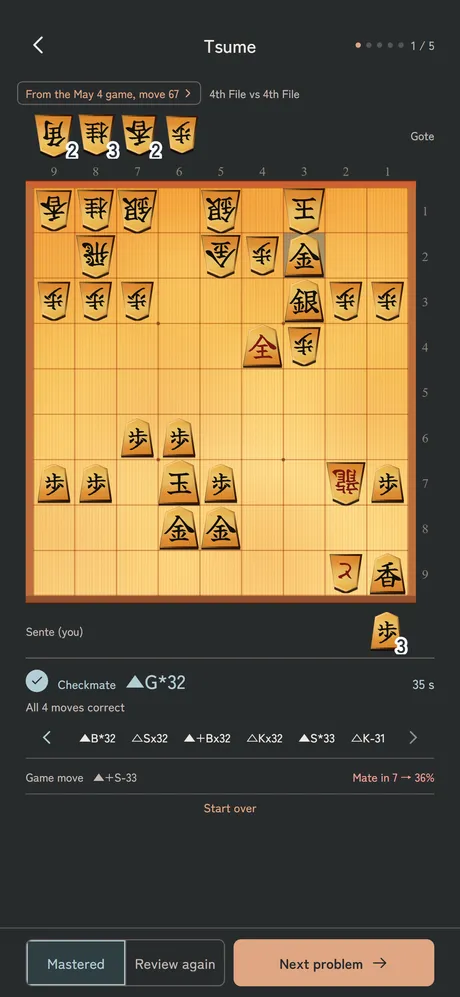
Mates of up to 7 moves that you missed in your own games become puzzles you play out all the way to checkmate. The app plays your opponent’s defense, so you learn the whole sequence, not just the first move but every move to the last.
04 Problem set
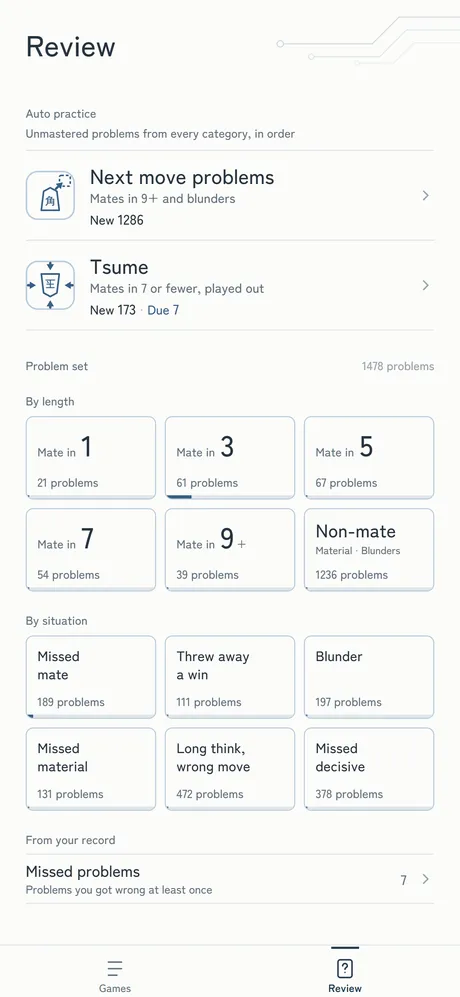
A win thrown away, a missed mate, a big blunder. Only positions with a clear gap between the right answer and the move you actually played become problems. For daily review, start with Auto practice: it serves your unmastered problems from every category, in order. In the problem set, you can re-solve any problem anytime, mastered ones included.
05 How to
Paste a game record as text (KIF, KI2 or CSA) or open a game file. Games shared from Shogi Wars, Shogi Quest or Piyo Shogi import directly. KIF files from Lishogi and 81Dojo work too.
The engine on our server analyzes positions in parallel, and the win-rate graph and best moves appear as each move is done. About 10 seconds even for a full game.
Jump from the graph to the positions you care about and check the best move and its line. Play a move on the board to check its win rate. Missed mates and blunders become tsume puzzles and problems in your problem set.
Any game you can export as KIF, KI2 or CSA can be imported, whichever service you play on.
Step-by-step answers to common questions.
PLANS
Free
0
Make game review an everyday habit.
Premium
Unlimited
Review as many games as you like.
Monthly and yearly plans available.
The same analysis depth on both plans.
YaneuraOu + Suisho 5 searches 1 million nodes per position.
Subscribe in the app. Prices and terms are shown in your local currency before purchase.
WITH CONFIDENCE
Email registration is optional. Explore analysis and practice with the sample game.
Download the appGame records are sent to our server for analysis. Read how your data is handled.
Privacy policyIndependently developed and operated. Send questions and suggestions by email.
Get in touch06 FAQ
It’s free to start, with no account sign-up needed. The free plan lets you analyze 3 games a day and try moves in 3 games a day. There is also a Premium plan (monthly or yearly) that makes game analysis and trial moves unlimited. Prices are shown in your local currency in the app before you buy.
Game records in KIF, KI2 and CSA formats (USI/SFEN and JKF are also supported). You can paste the text or open a game file. KIF files exported from Lishogi and 81Dojo work too. Shift_JIS and UTF-8 KIF files are both read automatically. To open a KIF file on your phone, see “How to open KIF files on your phone”.
In the Shogi Wars app, open the game record and copy it with the copy icon at the top of the screen. Then, in Shogi Analysis, tap “Add games” and “Paste from clipboard”. A URL copied from the game’s Share menu works the same way. For Shogi Quest and Piyo Shogi, copy the game record from the menu on the game screen, or share it and choose “Shogi Analysis”. For step-by-step guides, see Shogi Wars, Shogi Quest, Piyo Shogi, Lishogi and 81Dojo.
Yes. Records that start from a middlegame position, such as Sprint games, are analyzed from the starting position. Records with only a position, such as a Tsume Battle puzzle you couldn’t solve, become a problem if the side to move has a mate in 15 or fewer moves (tsume puzzles up to 7 moves, next move problems for 9 or more). See “How to analyze your Shogi Wars Sprint games” and “How to practice the Tsume Battle puzzles you missed”.
There’s almost no waiting. Positions are analyzed in parallel and each move appears as soon as it’s done, so you can start reviewing right after you add a game. A full game takes about 10 seconds for a game of around 100 moves (it varies with length and connection). Analysis runs on our server, so it doesn’t depend on your device’s performance.
The win-rate graph shows your win rate after every move, and a big drop marks a move that lost a lot of win rate. The mark on the board shows whether the last move matched the best move (◎ matches, ○ dropped less than 5 points, △ inaccuracy or mistake, × blunder), and below the board you can compare the eval and win rate of the move played and the best move. See “How to read a shogi game analysis”.
Yes. Move a piece on the Analysis board, and the win rate after that move and your opponent’s candidate replies are analyzed and shown on the spot. You can keep playing your opponent’s reply and the moves after it. On the free plan, you can try moves in up to 3 games a day. Unlimited with Premium. For more ways to find the best move, see “How to find the best move in shogi”.
Yes. Mates of up to 7 moves that you missed in your own games become tsume puzzles you play out to checkmate. The app plays your opponent’s defense, and any move that mates within the moves remaining counts as correct. If you take a detour, you can go back and play again without affecting your score. Mates of 9 moves or more, and blunders such as missing material or a single move that spoiled the position, become next move problems scored on the first move. If you get it right with a mating move, you can keep playing to checkmate.
Yes. In the problem set, choose by length (Mate in 1 to Mate in 9+, or Non-mate), by situation (Missed mate, Threw away a win, Blunder, Missed material, Long think, wrong move, or Missed the decisive move), or from your missed problems, and re-solve them anytime, mastered ones included. Every problem keeps a record of your attempts.
Review (next move problems, tsume puzzles and the problem set) works offline. Problems are saved on your device, so you can solve them where there’s no connection. Your results are sent to our server when you’re back online. Adding and analyzing games and the Analysis screen need an internet connection.
Yes. Register an email address on the Account screen. On your new phone, enter the confirmation code sent to that address, and your games, analysis results and review records come with you. Registering an email is optional; you can use the app without one.
Analysis runs on our server, so it searches 1 million nodes per position regardless of your phone’s performance. Not only the moves played and the candidates, but also moves you try by moving pieces on the board are analyzed on the spot. Mistakes are judged by how much the win rate drops, and in lopsided positions by the drop in eval as well. Mates you missed become tsume puzzles you play out to checkmate, your blunders become your own problem set, and you can review offline.
We use YaneuraOu with the Suisho 5 evaluation function, searching 1 million nodes per position. Both run on our server and are not included in the app. YaneuraOu is open-source software under GPLv3, and its source code is available on GitHub. Suisho 5 is an evaluation function created by tayayan.
To analyze them, the games you import are sent to our server. For details, please see our Privacy Policy.
Still need help? Please contact us.

From the developer
What if I had played a different move in that position? Explore a move that caught your attention, then turn what you discover into practice with your own games. Shogi Analysis aims to make reviewing a natural part of everyday play.
Shogi Analysis is developed and run by an individual developer. Please send your comments and requests through the contact page.
Shogi Analysis
Make Shogi Analysis part of your post-game routine.
Free to start · No sign-up